
GA4 Ecommerce Tracking Setup: The Complete Event Schema Guide (2026)
Nearly every GA4 property I audit has the same two symptoms. The funnel report makes no sense, and the item report is half empty. The owner has usually decided GA4 is bad software.
GA4 is fine. Someone installed the purchase event, called it ecommerce tracking, and walked away.
Proper ecommerce tracking means every step of the journey fires as its own event, with the product data attached. Here’s the schema I build for Shopify and WooCommerce stores, and the testing routine that catches the things a tag preview won’t.
The seven events that make up the funnel
view_item when a product page loads, then add_to_cart, view_cart, begin_checkout, add_shipping_info, add_payment_info, and purchase. Bigger catalogs also get view_item_list and select_item for collection pages, though I only add those when the catalog is large enough for the data to be worth reading.
Every one of these needs an items array. That single detail separates working setups from the ones that look fine in reports until you try to use them.
Step 1: The dataLayer push everything depends on
Here’s view_item. Every other event uses the same shape with its own name and its own values:
dataLayer.push({ ecommerce: null });
dataLayer.push({
  event: 'view_item',
  ecommerce: {
    currency: 'USD',
    value: 49.00,
    items: [{
      item_id: 'SKU-2201',
      item_name: 'Linen Overshirt',
      item_category: 'Shirts',
      price: 49.00,
      quantity: 1
    }]
  }
});
Two details people skip. The ecommerce: null push on the first line clears the previous object, otherwise events inherit stale product data from whatever happened before them, and you get add_to_cart events carrying yesterday’s product. And currency belongs on every event, because GA4 drops revenue attribution without it and never says a word about why.
Step 2: One GA4 event tag per event
In GTM, each event gets its own GA4 event tag with the matching name, ecommerce data enabled, reading from the dataLayer. Custom Event triggers fire each one.
Resist the urge to be clever here. I’ve inherited containers with one mega-tag and a regex trigger doing all seven, and they are miserable to debug. Seven boring tags are easier to fix at 11pm than one ingenious one.
Step 3: Mark purchase as a key event and link Google Ads
In GA4 admin, mark purchase as a key event, then link the Google Ads account so conversions and audiences flow through. If you run ads, this link is the whole point of the schema. Google can now bid toward people who reached checkout, not just people who already bought.
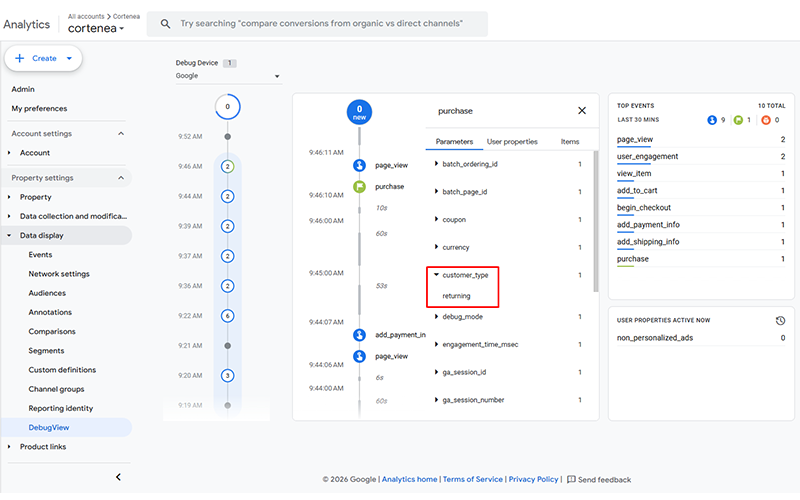
While you’re in there, a custom dimension separating new from returning customers is fifteen minutes of work and changes how you read every report afterwards. Acquisition cost and repeat revenue stop being one blended number.
Step 4: Sit in DebugView until it gets boring
I test every build live in DebugView before I hand it over. Real product views, a real cart, a real test checkout, watching each event land in order with its parameters expanded.
On the store behind this guide, that routine caught checkout events firing with no item data at all. It looked perfect in the tag preview. It would have looked perfect for about three weeks, right up until someone tried to build an audience from it.
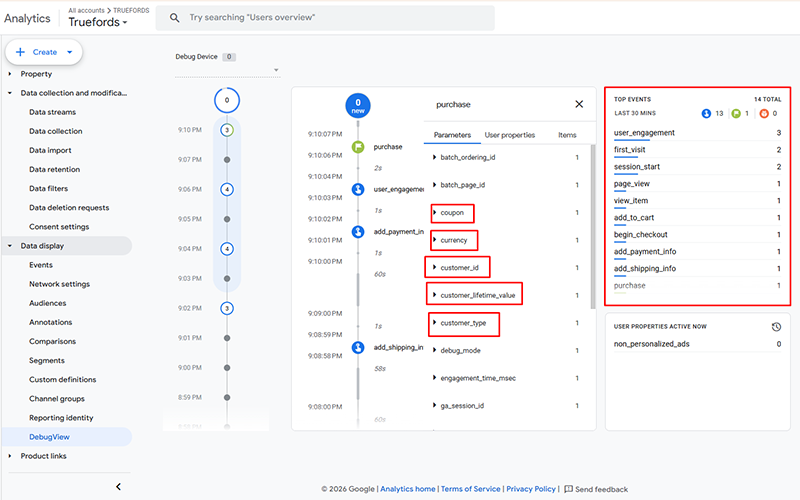
Your version of this test: turn on debug mode, click through your own store like a customer, and watch the stream. Missing steps, doubled events, or events without items means your funnel reports have been lying to you politely for months.
Why the funnel matters more than the purchase
Purchases tell you what already happened. The funnel tells you why more of them didn’t.
Once every step was tracking on this store, the drop between add_to_cart and begin_checkout turned out to be far bigger than anyone expected. That pointed straight at shipping costs appearing too late in the flow. It was a business problem, found through tracking, and no amount of ad budget would have fixed it.
If your GA4 can’t tell you where people are dropping off, get in touch. I’ll open DebugView on your store and tell you which events are missing or broken before you commit to anything.