
Facebook Conversions API Setup With Server-Side GTM: Complete Guide (2026)
Go open Meta Events Manager right now, find your purchase event, and look at the Event Match Quality column. I’ll wait.
If that number is under 6, Meta is guessing who your customers are, and you’re paying for those guesses on every campaign you run. Most Shopify stores I audit sit somewhere between 3 and 6, and almost none of the owners know the column exists.
The store in this guide was a Shopify apparel brand. Standard pixel install, results that got noticeably worse after every iOS update, and a purchase match quality bad enough that their retargeting audiences were a fraction of the size they should have been. Here’s what I built, and where it ended up.
Why the browser pixel stopped being enough
The pixel runs in the browser, and the browser turned hostile years ago. Safari caps cookie lifetime at seven days. iOS asks people whether they want to be tracked and most of them say no. Ad blockers remove the pixel file before it ever loads. Every one of those is a sale that happened and that Meta never saw.
The Conversions API sends the same events from your server instead. No ad blocker can strip it, no cookie policy applies to it, and you decide exactly which customer parameters ride along. Those parameters are what your match quality score is actually measuring.
Step 1: Stand up the server container
You need a GTM server container running on your own subdomain, something like track.yourstore.com. I deploy these on Stape or Google Cloud Run depending on volume and how much the client wants to spend. Stape is easier, Cloud Run is cheaper at scale.
The subdomain is not cosmetic. It’s what makes the whole setup first-party, which is the entire reason this works. Your web container forwards events to the server container, and the server container holds the Meta CAPI tag with your pixel ID and access token from Events Manager.
Step 2: One event_id, both sides
Deduplication lives or dies here. The pixel event and the server event for the same purchase have to carry the same unique ID. I generate it once, when the event happens, and hand it to both. For purchases the order number is perfect, because it’s already unique and already available:
// generated once, shared by pixel and CAPI
var eventId = 'purchase_' + orderId;

dataLayer.push({
  event: 'purchase',
  event_id: eventId,
  transaction_id: orderId,
  value: 89.00,
  currency: 'USD'
});
Get this wrong and Meta counts every sale twice. Your reported ROAS inflates, your cost per purchase looks better than it is, and every decision you make afterwards is wrong in the direction that costs you the most money.
Step 3: Send real parameters on every event
Match quality is a direct function of what you send. On purchase and checkout I send hashed email and phone, first and last name, city, state, zip and country. On every event, including view content and add to cart, the server forwards the client IP address, the user agent, and the fbp and fbc cookies.
That last sentence is where most setups fall over. People configure customer data beautifully on the purchase event and forget that view_item and add_to_cart have match quality scores too. Meta builds your retargeting audiences from those events. Starve them and your audiences shrink while you wonder why prospecting got expensive.
Step 4: Test until Events Manager agrees with you
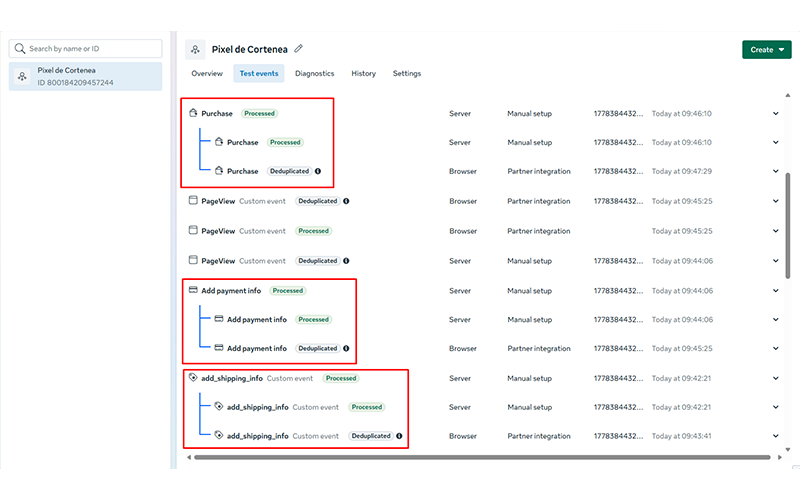
Open the Test Events tab, run a real browsing session, and fire every event type. You want to see each one appear twice, browser and server, deduplicating cleanly. Then click into each event and read the parameter list. Anything you configured that isn’t there is a bug, not a rounding error.
After that, wait. Match quality scores take a few days to settle, so don’t panic on day one if the number hasn’t moved yet.
What it did for the store
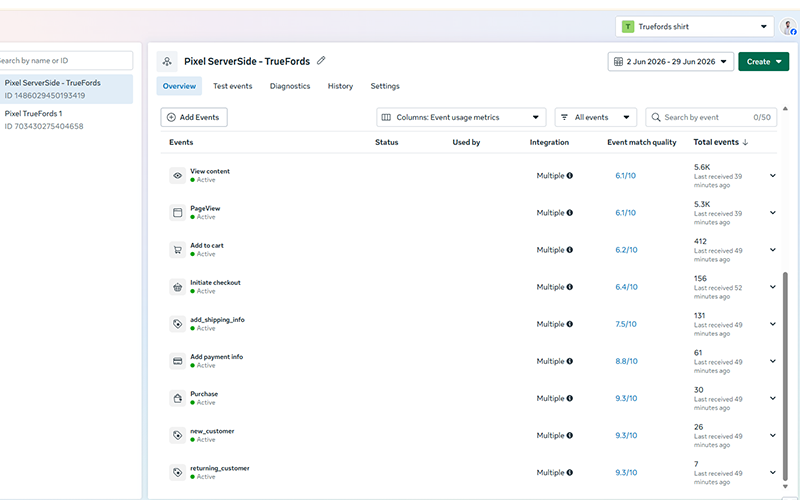
Purchase events now match at 9.3 out of 10. Meta calls anything above 8 great, and most stores never see it. The iOS purchases the browser pixel was missing entirely came back, hundreds a month of them. Cost per result dropped, not because we touched the ads, but because the algorithm finally had real conversions to optimise toward.
None of this was creative work. It was plumbing.
If your match quality is sitting under 6 and you want it looked at, message me. I’ll go through your Events Manager and tell you exactly what your setup is missing, no charge for the look.